

The application is old, quirky, full of behaviour accumulated over decades, and you are not going to fix all of that. You do not have to. Webswing sits over the running Swing application like a pane of glass: the same app underneath, with all its habits intact, wearing a modern web interface on top.
“There are two ways of constructing a software design: one way is to make it so simple that there are obviously no deficiencies, and the other way is to make it so complicated that there are no obvious deficiencies.” Tony Hoare said that in his Turing Award lecture, and it is the right lens for what follows. Putting a modern surface over a working application is the first kind of change: small, inspectable, reversible. Rewriting the application so it can look modern is the second, and its deficiencies stay hidden right up until go-live.
Let us be honest about the application first. It is not a showcase of clean code. It has the odd checkbox nobody dares remove, the field that must be filled before another one unlocks for reasons lost to history, the long accumulation of quirks that are now, quietly, how the business runs. You are not going to rewrite all of that, and you should not. Yet the complaint that lands on your desk is not about any of it. It is cosmetic: the application looks old, the buttons look like another decade, users say it feels dated. This article is about answering exactly that complaint, and nothing more, without touching the quirks underneath.
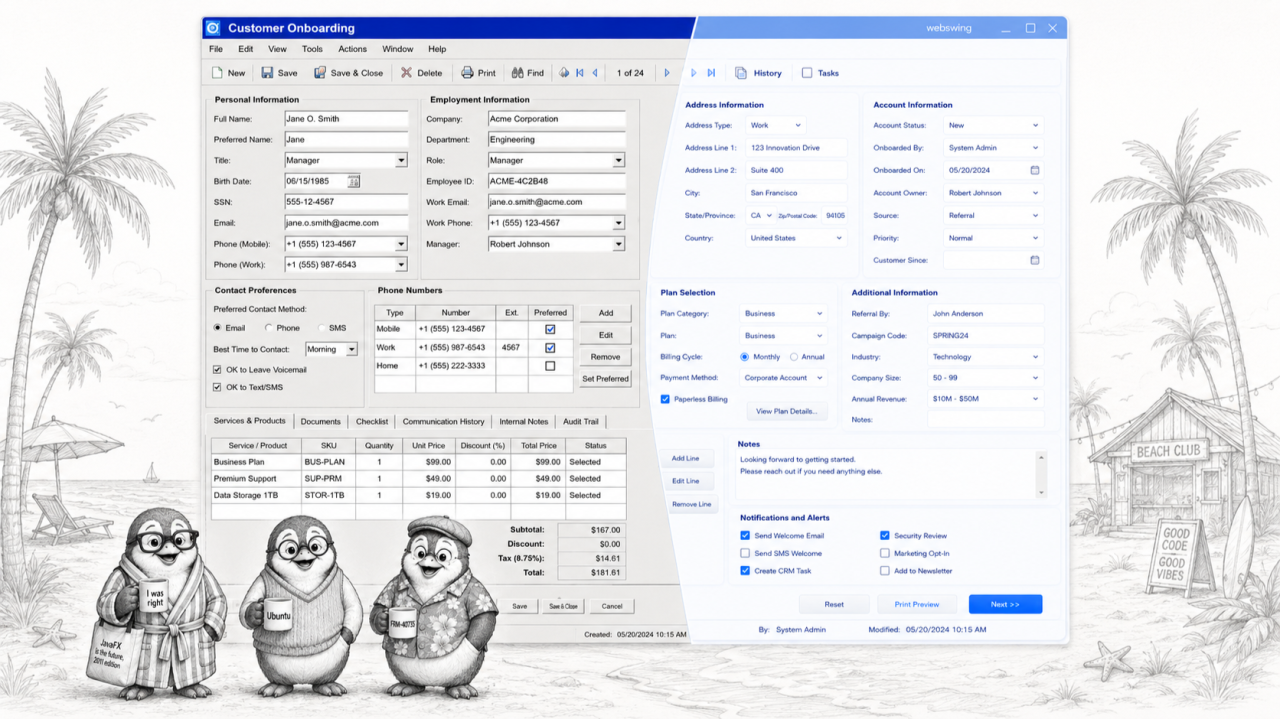
A pane of glass over the running app
Webswing runs the existing Swing application on the server and renders it in the browser. Its modernisation framework then maps a modern web interface onto that running application, like a pane of glass laid on top: not a static overlay, but a live layer through which the original app keeps running behind it, unchanged, with every one of its old habits, while the glass shows a clean, current, web-styled surface. The existing Swing components are rendered as native web components and styled with CSS; the component tree, the event handling, and the business logic stay exactly where they are. Nothing underneath is rewritten. You are not fixing the application. You are giving it a new face.
Swing was built to allow this
This is not a trick bolted on from outside; it is the seam Swing shipped with. Every component is split in two, the part that holds state and behaviour, and a separate UI delegate that paints it. That pluggable look-and-feel architecture exists precisely so appearance can change while behaviour does not. Swap the look and feel and the same JButton, the same JTable, the same long-lived form renders differently and behaves identically. Webswing extends that same seam to the browser. Your “legacy” application has kept presentation and logic separable since the day it was written, which is exactly why a modern face can be laid over it without disturbing anything beneath.
See it side by side
Webswing’s public demo shows this literally, and you can open it yourself; the link is in the references below. In the Component Migration example, the Complex form screen puts the two versions next to each other: on the left, the original Swing form, grey and beveled, the Name field, the Age dropdown, the Gender radio buttons, the I agree checkbox, the plain Submit. On the right, the very same form, the same fields, the same behaviour, rendered as a modern web form, rounded inputs, a clean dropdown, a solid blue Submit. If the old form refused to enable Submit until I agree was ticked, the new one refuses in exactly the same way, because it is the same form underneath. Same application, same logic, two faces. The right-hand version is not a rewrite. It is the glass.
Muscle memory survives the makeover
Because only the surface changed, adoption costs almost nothing. The controls are the same controls, in the same places, doing the same things, only better dressed. Fifteen years of muscle memory transfers on day one; nobody is retrained, nothing is relearned, and the help desk does not spend a quarter translating between the old screen and the new one. Users get the single thing they actually asked for: an application that looks like it belongs to this decade, behaving exactly like the tool they already trust. The most visible change in the whole system turns out to be the one nobody has to feel.
What this is not
Honesty matters, because a new face is not a new application. The glass changes how the app looks; it does not fix a broken workflow. If a process itself is wrong, too many steps, the wrong field on the wrong screen, a fresh coat of styling only makes the wrong workflow prettier. That is a real redesign, done deliberately, one screen at a time, when it earns the investment. Two practical notes belong here as well: the deeper component-level modernisation is a licensed capability rather than a free switch, and the further you move beyond stylesheets toward re-rendered components, the more you should test that the restyled controls still behave as the originals did. Modernising the surface is cheap and safe; anything past that is real work, and worth naming so nobody expects paint to move a wall.
The point, in money
Here is where it lands for the business. Your company already runs modern web applications in production; your customers and staff know what current software looks like, and your decades-old Swing tool no longer matches it. It does not have to be rewritten to match it. Put the glass over it, and that same old application can appear in the browser looking, screen for screen, like a modern web app, the way the right-hand form in that public demo does, while every quirk, rule, and hard-won behaviour keeps running underneath, untouched. How close to one-to-one you get depends on how far you take the component migration, and that is a dial you control, not a rewrite you commit to. No multi-year rebuild, no re-authoring of decades of logic. The look moves forward; the years of behaviour beneath it do not move at all. Millions saved. You are welcome.
Sources
arrow_back_ios