

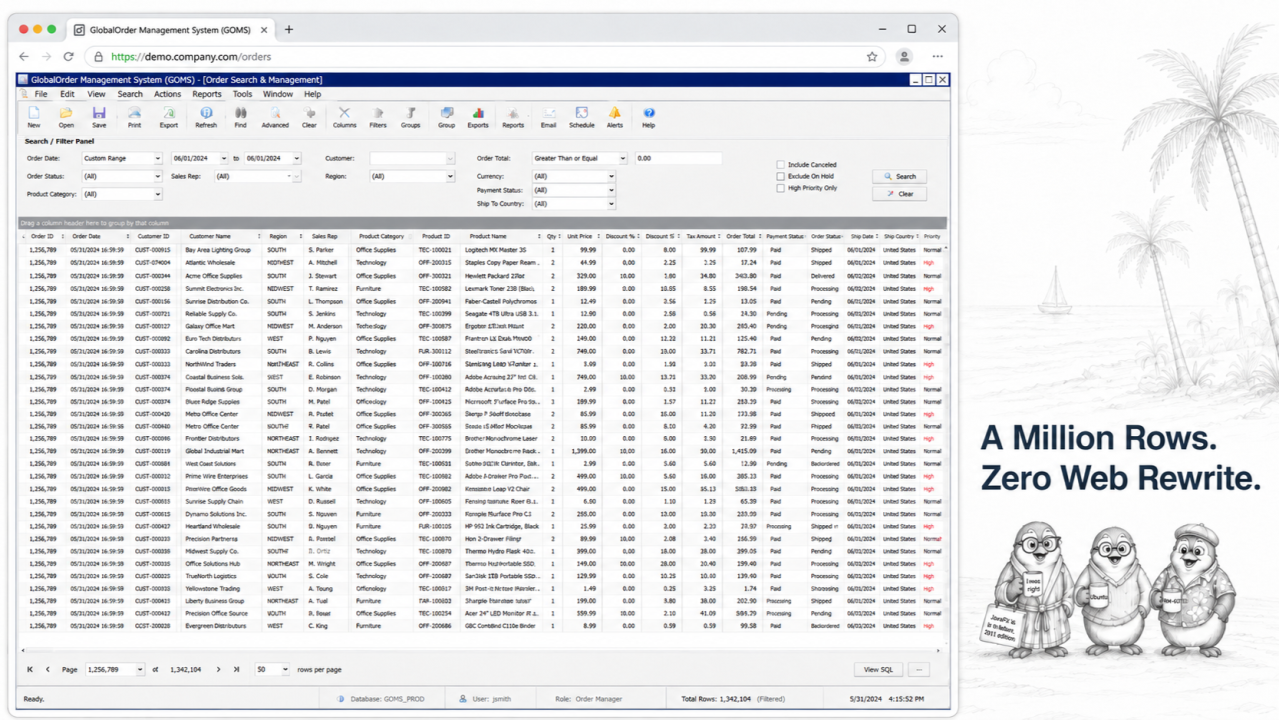
In a native web rewrite, the data grid is where the budget goes to die: REST endpoints, pagination, virtualisation, megabytes of JSON. Run the same Java Swing application in the browser instead, and the browser does not have to become a second data-grid engine. The JTable keeps running on the Java side; the browser displays the rendered interface and sends user input back.
“Any fool can write code that a computer can understand. Good programmers write code that humans can understand.” Martin Fowler’s line is usually read as advice for writing new code. It is also the right way to price old code: twenty years of table-model classes, cell renderers, and editors that generations of maintainers could read, fix, and extend is not technical debt. It is an asset a rewrite would spend years failing to reproduce.
Picture the analyst who opens your Java Swing application every morning, loads a JTable of a million invoice rows across seventy columns, and sorts by three of them in an order no developer ever thought to test. That screen works today. It is also the screen every web rewrite quietly fears, and every web developer knows why: the replacement grid demos beautifully on two hundred rows of sample data, and then someone connects it to production. Many Swing teams solved their large-table problem years ago, inside the application they still run. What the demo meetings rarely mention is that their solution can survive the trip to the browser untouched.
The mechanism, stated plainly: Webswing runs the existing Java Swing application on the server and delivers the rendered interface to the browser. A large JTable or JTree keeps running on the Java side, together with its model, renderers, editors, selection behaviour, and business rules. The browser does not need a second copy of the grid logic or a client-side model of the full dataset. The rest of this article is how that plays out, including the bandwidth answer for the skeptics.
The grid is where web rewrites go to suffer
Rebuilding a serious JTable as a native web grid means rebuilding everything around it: REST endpoints, JSON serialisation, server-side pagination, client-side virtualisation, scroll-position state, in-cell editing, keyboard navigation, custom renderers for dozens of domain-specific cell types, and the invisible things, the exact behaviour of tab, enter, and multi-select that users’ hands have known for fifteen years. Every one of these is a solved problem in the application you already run. Rebuilding them re-answers, expensively, questions the old code answered long ago. This is the do-not-repeat-yourself principle at the scale of a whole system: the most reliable way to get a large data grid wrong is to write a second one.
The real abstraction is not the grid. It is the TableModel.
Swing already separates the table view from the data contract. A JTable asks its TableModel what exists: how many rows and columns, what value belongs at a given cell, what type each column holds, what is editable, and what just changed. In a serious enterprise application, that model is rarely a dumb in-memory array. It is backed by database queries, lazy loading, filters, caches, permissions, and domain rules, and sorting and filtering are handled by a RowSorter that the model itself does not have to implement. That separation, view over model, is the part a rewrite consistently underestimates: reproducing the grid pixels is easy, but reproducing twenty years of model behaviour faithfully is the project that overruns. Keeping the application means keeping that model exactly as it is.
The browser is the delivery surface, not the grid engine
This is the idea the whole approach rests on. In Webswing, the application runs on the server; the browser receives the rendered interface over a WebSocket connection and sends user input back. The model and its behaviour stay on the Java side, and the browser becomes the delivery surface rather than a second grid engine. When a user scrolls a million-row table, what crosses the network is an image of the visible rows; when the user sorts or filters, that work happens on the server, in the model layer or the database where the data already lives, and the browser shows the result. There is no requirement to expose the table as a paged JSON API just to display it in a browser.
The server sits next to the database
There is a quieter advantage, and it often surprises people. In the old desktop model, every user pulled large result sets across the network to their own machine, so the same rows were fetched again and again, once per user, each pull competing with everyone else’s for bandwidth. Move the application to the server and that traffic collapses. The application now sits typically one network hop from the database instead of a continent away across a customer’s connection, so the heavy conversation, filters, joins, aggregations over millions of rows, happens between two machines on a fast internal network, and the customer’s connection carries the rendered interaction. For remote users, perceived latency can improve, because the heavy data conversation moves closer to the database and only the interface travels to the person.
The bandwidth answer, for the skeptics
The obvious objection is bandwidth: surely streaming a scrolling table is heavier than sending JSON? For genuinely large datasets it often runs the other way, depending on how much of the screen actually changes. Only the changed regions of the screen are transmitted, so the cost is tied primarily to what changes on screen, not to the total number of rows the model can address. Scrolling a viewport of fifty visible rows costs roughly the same whether the table behind it holds ten thousand rows or ten million. A native grid, by contrast, tends to pay in proportion to the data it moves and the client-side machinery it needs to tame it. The cost model is simply different, and past a certain dataset size it often favours delivering the rendered view.
Performance still belongs to the right layer
None of this makes bad table code good. If the desktop application freezes because it eagerly loads a million rows into memory, browser delivery will not turn that into a sound data architecture. Queries still need indexes. Table models still need lazy access where the dataset demands it. Filters still need to reduce the working set, and long operations still need background execution off the UI thread. Webswing changes the delivery surface; it does not remove the need to design the data layer properly. What it does remove is the need to rebuild a working, well-designed model as a second system just to reach the browser.
What an engineer will still ask
Memory and sizing are the fair questions. Each user is a managed application session in a session pool, sized deliberately and monitored, rather than an unbounded browser tab, so capacity is something you plan and observe rather than discover in production. And the limits are real: screens that repaint rapidly and continuously, animation-heavy visualisations or real-time tickers, cost more to render remotely and deserve a test before any promises are made. A data grid that redraws when the user acts, however large the dataset behind it, is exactly the workload this model handles well.
The code was the asset all along
Return to Fowler. A TableModel, a set of renderers, and an editing layer that generations of maintainers could read, fix, and extend is precisely the kind of code his line values: comprehensible, production-hardened, correct in the ways that matter. Treating it as an embarrassment to be rewritten misprices it. The fastest way to keep its value is to stop trying to replace it and start delivering it through the browser instead.
When a native web grid is the right call
This is not an argument that grids should never be rebuilt. If a dataset must also serve a public API, work offline, or live mobile-first on phones, a native web grid is the right tool, and it can be built for that one screen, in the web technology of your choice, on the same platform, when it earns the investment. The point is narrower and more useful: you do not have to rebuild a working million-row JTable just to put it in a browser, and rebuilding it is usually the most expensive way to get there.
What the customer saw
For a well-designed grid, the customer gets the same fast filter over the full dataset, the same sort, the same keyboard shortcuts their hands already know, now reachable from any browser instead of one installed desktop. What they did not see: a spinner, a “page 1 of 40,000,” or a request to please narrow their search before the grid would load. The application never noticed the difference either.
Sources
• Oracle Java Documentation, JTable (a view over a TableModel; auto-created RowSorter for sorting)
• MDN Web Docs, The WebSocket API (full-duplex client-server communication over a single connection)
• Webswing docs, 26.1 Session Pool (application instances as managed, sized, monitored sessions)
arrow_back_ios