

Access Control
Security concept
Security can be configured for the server and per application separately. Using different user base per application and for Admin Console access enables easy multi-tenant deployments.
To set up security for the server, use the "Server Config" page in Admin Console Overview. Application security is part of application's config screen.
Both server and application security use the same configuration options.
First, select the security module from the list of built-in modules.
Available modules
| Module | Description | Public |
|---|---|---|
| INHERITED | Application does not define its own security, but shares security context with server instead. This module is not available on the server. | ☑ |
| NONE | Enables anonymous access to application. No login is required. | ☑ |
| EMBEDDED | Users, passwords and roles are defined directly in webswing.config configuration file. | ☑ |
| PROPERTIES | Users, passwords and roles are defined in a properties file. | ☑ |
| DATABASE | Users are stored in database. The library with JDBC driver has to be specified in security module's class path. Database connection details has to be defined. | ☒ |
| OPENID_CONNECT | Single-sign-on using OpenID Connect protocol. | ☒ |
| SAML2 | Single-sign-on using SAML2 protocol. | ☒ |
| KEYCLOAK | Keycloak authentication server integration module. | ☒ |
| Custom module | The custom security module can be created and fully-qualified class name defined. | ☒ |
Advanced security modules are distributed as individual archives through Webswing Client Portal and are available only to Webswing Customers. Download the required module and extract the archive directly into the Webswing home directory. The archive already contains its security/<module> target directory, so the Admin Console will find the module automatically without installing unrelated security modules.
unzip <downloaded-zip> -d <webswing-home>
Configuration
Properties
The built-in PROPERTIES module defines users in property file.
"security": {
  "module": "PROPERTIES",
  "config": {
    "file": "${webswing.rootDir}/user.properties"
  }
}
file defaults to ${webswing.rootDir}/user.properties. User entries use ordinary
Java properties syntax, with the password followed by optional comma-separated
roles:
user.admin=pwd,admin,user
user.user=pwd,user
user.guest=pwd
Passwords can be plaintext or existing Webswing $hashed$... values.
Changes to the file are reloaded automatically, approximately every 10 seconds,
and apply to subsequent authentication, including session-unlock checks.
An initially missing, unreadable or malformed properties file fails module
initialization. If a later reload fails, the module logs a warning, keeps the last
valid users and retries on the next reload.
Keycloak vs OIDC
OIDC security module, can integrate directly with Keycloak and with other providers, like Okta, Active Directory, Azure. Using the Keycloak module requires definition of the providers as realms in Keycloak.
Keycloak integration is an extension of the OIDC module that allows the setup of multiple realms to be used as identity providers. When user logs-in realm is selected as a url parameter ?realm=master
This is useful in specific use cases where users are forwarded to webswing from different sources or if administrators and users are defined in different places, this way they can be united in one security module.
Client secret obfuscation
The OpenID Connect and Keycloak modules accept client secrets obfuscated with webswing-api.jar. From the Webswing installation directory, run:
java -jar api/webswing-api.jar obfuscate 'your-client-secret'
Copy the complete output, including the OBF: prefix, into security.config.clientSecret for OpenID Connect or security.config.realms[].clientSecret for Keycloak. Plain text secrets are also supported, and the field can be left empty when a client secret is not required.
Variable replacement happens before deobfuscation, so a configuration variable can also provide the obfuscated value. Obfuscation is reversible and is not encryption.
Keycloak with Keycloak Module
OpenID Connect with Auth0 Configuration
OIDC Logout
For OIDC logout 2 additional configuration attributes are important:
- logoutUrl - Identity Provider Logout URL with URL params:
- id_token_hint = required attribute with value ${user.id_token}
- post_logout_redirect_uri = optional redirect uri
- attributeMapping = mapping of the id_token which is used in the logout url as a parameter
In the following example Webswing is running on port 8080 and OIDC Identity Provider is on port 8081:
"/oidc-demo" : {
    "path" : "/oidc-demo",
    "enabled" : true,
    "name" : "oidc-demo",
    "webFolder" : "${webswing.rootDir}/apps/WebswingDemo/webroot",
    "restrictedResources" : [ ],
    "langFolder" : "",
    "security" : {
      "module" : "org.webswing.security.modules.openidconnect.OpenIDConnectSecurityModule",
      "config" : {
        "importDiscoveryJson" : "http://localhost:8081/auth/realms/master/.well-known/openid-configuration",
        "callbackUrl" : "http://localhost:8080/oidc-demo/login",
        "clientId" : "webswing-oidc",
        "usernameAttributeName" : "preferred_username",
        "scopes" : "openid profile",
        "logoutUrl" : "http://localhost:8081/auth/realms/master/protocol/openid-connect/logout?id_token_hint=${user.id_token}&post_logout_redirect_uri=http://localhost:8080/oidc-demo",
        "attributeMapping" : [ "id_token" ],
        "rolesAttributeName" : "roles"
      },
For user attributes debugging purposes you can enable the User Attributes Logging in the Admin Console which will print all users attributes and corresponding values to the logs after successful login.
ID Token Attribute Details:
Name: aud      Value: l9ncfFy93A6Tfi2wTj4t2YTIhHMdi6tb
Name: exp      Value: 1744395560
Name: iat      Value: 1744395560
Name: iss      Value: https://dev-webswing.org/
Name: sub      Value: RXQ89M-OMyEE9|NQ36LzvXCMU7MKNyRqalh
Name: https://dev-webswing.org/roles       Value: [admin]
Name: given_name       Value: John
Name: family_name      Value: Doe
Name: nickname         Value: Joe
Name: name     Value: John Doe
Name: picture          Value: https://pictures.com/johndoe.png
Name: updated_at       Value: 2025-04-11T08:19:19.889Z
Name: sid      Value: esiwMhV0Mj2hsVBrZnFw9glY6gk14HO9
SAML2 with Onelogin
The current SAML2 module requires Java 17 or newer for the Webswing server.
Isolate security context per browser tab
If you want to have a separate security context in each tab that you open in the same browser, you can use securityContextPerTab configuration parameter.
Hashing passwords in Embedded and Properties security modules
Both modules accept the existing Webswing $hashed$... password format. For
Properties, put the generated value before the optional comma-separated roles in
user.<username>=<password>[,role1][,role2]. Webswing automatically hashes Embedded
passwords entered in Admin Console.
Open Admin Console > Applications > Security Module Config, change the password and click Apply.
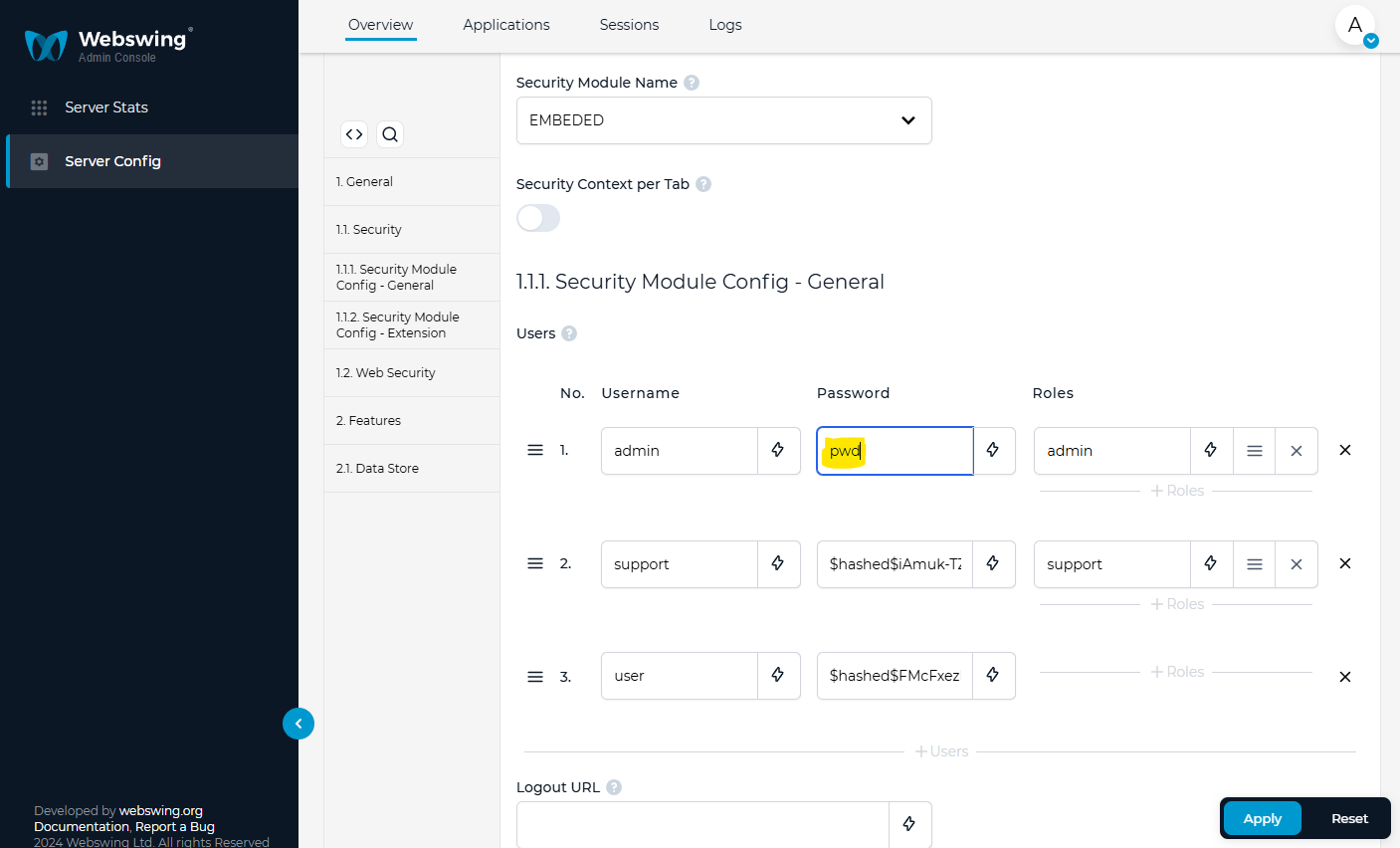
To generate a password hash from the Webswing distribution directory, run:
java -jar api/webswing-api.jar hash "your-password"
For a Properties user, copy the printed $hashed$... value after user.<username>=
and before any comma-separated roles. Use hash, not the obfuscate command used
for keystore passwords.
The password can be hashed programmatically by creating a small JUnit test:
package org.webswing.server.services.security.modules.configtest;

import org.junit.Test;
import org.webswing.toolkit.api.HashUtil;

public class TestPasswordHash {

    @Test
    public void test() {
        String password = HashUtil.hash("password".toCharArray());
        System.out.println("Hashed password is: " + password);
    }

}
Webswing Action
Webswing has a finely defined set of different actions that can be executed by a user. Actions are grouped by Access Types. Default Access Types are basic, support, admin.
Default mapping of actions to access types is:
| Action | Purpose | Admin | Support | Basic |
|---|---|---|---|---|
| master_admin_access | Master | ☑ | ||
| master_support_access | Master | ☑ | ☑ | |
| master_basic_access | Master | ☑ | ☑ | ☑ |
| rest_getPaths | Admin Console | ☑ | ☑ | |
| rest_getAppInfo | Admin Console | ☑ | ☑ | |
| rest_getSession | Admin Console | ☑ | ☑ | |
| rest_getStats | Admin Console | ☑ | ☑ | |
| rest_startRecording | Admin Console | ☑ | ☑ | |
| rest_sessionShutdown | Admin Console | ☑ | ☑ | |
| rest_sessionShutdownForce | Admin Console | ☑ | ☑ | |
| rest_getConfig | Admin Console | ☑ | ☑ | |
| rest_setConfig | Admin Console | ☑ | ||
| rest_startApp | Admin Console | ☑ | ||
| rest_stopApp | Admin Console | ☑ | ||
| rest_createApp | Admin Console | ☑ | ||
| rest_removeApp | Admin Console | ☑ | ||
| rest_getThreadDump | Admin Console | ☑ | ☑ | |
| rest_getHeapDump | Admin Console | ☑ | ☑ | |
| rest_requestThreadDump | Admin Console | ☑ | ☑ | |
| rest_requestHeapDump | Admin Console | ☑ | ☑ | |
| rest_toggleStatisticsLogging | Admin Console | ☑ | ☑ | |
| rest_setAppLogLevel | Admin Console | ☑ | ☑ | |
| rest_getOverview | Admin Console | ☑ | ☑ | |
| rest_manageScaling | Admin Console | ☑ | ||
| rest_controlSessionPool | Admin Console | ☑ | ||
| rest_reloadWebsocketUrls | Admin Console | ☑ | ||
| rest_getScalingInfo | Admin Console | ☑ | ☑ | |
| rest_viewLogs | Admin Console | ☑ | ☑ | |
| rest_getApps | Admin Console | ☑ | ☑ | ☑ |
| rest_getMetrics | Admin Console | ☑ | ☑ | ☑ |
| rest_getOneTimePassword | Security | ☑ | ☑ | |
| websocket_connect | WebSocket | ☑ | ☑ | ☑ |
| websocket_startRecordingPlayback | WebSocket | ☑ | ☑ | |
| websocket_startSwingApplication | WebSocket | ☑ | ☑ | ☑ |
| websocket_startMirrorView | WebSocket | ☑ | ☑ | |
| file_download | File Handling | ☑ | ☑ | ☑ |
| file_upload | File Handling | ☑ | ☑ | ☑ |
AccessTypes are mapped to Roles.
Default mapping of access type to role is:
| Access Type | Role |
|---|---|
| admin | admin |
| support | support |
| basic | authenticated |
These mappings can be customized by implementing the RolePermissionResolver interface.
Please have a look at default implementation in org.webswing.server.common.model.security.WebswingAction
Maven Dependency
Webswing provides a security api when you need a custom security module. In your project you need to setup maven repository and dependency on webswing-server-security-api like:
<repositories>
        <repository>
            <id>webswing-public</id>
            <url>https://dev.webswing.org/public/nexus/repository/webswing-public/</url>
        </repository>
</repositories>

<dependencies>
    <dependency>
        <groupId>org.webswing</groupId>
        <artifactId>webswing-server-security-api</artifactId>
        <version>26.2</version>
    </dependency>
</dependencies>
In case you need help with security setup, contact support@webswing.org