

Javascript API
Webswing provides an NPM module for easier integration of Webswing to javascript/typescript projects. This allows easier integration of Webswing into the existing web project. The module provides typescript declarations.
Requirements: This module works with Webswing 22.2 and newer.
Installation
npm install webswing-api
Basic Usage
import { getWebswingApi } from 'webswing-api'

getWebswingApi("http://localhost:8080/webswing-demo").then((api) => {
    api.bootstrap(document.getElementById('rootElement'))
})
The getWebswingApi function asynchronously loads the Webswing JavaScript client from the Webswing server identified by the connectionUrl parameter. When the client is loaded, it returns an API object that can bootstrap a Webswing view into a DOM element or create it in a detached state.
Usage with Customization and Options
import { getWebswingApi } from 'webswing-api'

const connectionUrl = "http://localhost:8080/webswing-demo"

getWebswingApi(connectionUrl, i18n).then((api) => {
    const instance = api.bootstrap(document.getElementById('rootElement'), {
            //here define basic bootstrap options like:
            autoStart: false,
            args: 'customArgs sent to Swing app',
            onReady: () => { instance.start()},
            onStart: () => {// ...}
        },
        (injector) => {
            // here define more advanced customizations of Webswing JS client behavior like dialog contents:
            injector.services.dialog.content.startingDialog.content = `<p>MyApp is being started</p>`
            injector.services.dialog.content.initializingDialog.content = `<p>MyApp is being initialized</p>`
        }
    )
}).catch((e) => {
    console.error(e)
    // ...
})
The getWebswingApi function allows to pass in custom translations logic and with the bootstrap function you can modify the bootstrap options and also define advanced customizations of the Webswing client behavior.
Detached Instances
Pass null as the first argument of bootstrap to create an instance without attaching its content to the DOM. A non-null host is initialized normally even when it has not been inserted into the document yet. The instance starts automatically unless autoStart is set to false, and its connection and Swing session remain active while it is detached. Use setElement to attach the content when a host becomes available, and pass null again before a framework unmounts that host. Calling setElement(null) while the instance is already detached is a no-op.
import { getWebswingApi } from 'webswing-api'

const api = await getWebswingApi('http://localhost:8080/webswing-demo')
const instance = api.bootstrap(null)

// Attach the running instance.
instance.setElement(document.getElementById('rootElement'))

// Detach it while preserving the connection and Swing session.
instance.setElement(null)

// The same instance can later be attached to another host.
instance.setElement(document.getElementById('nextRootElement'))
getElement returns the host element currently associated with the instance. After setElement(null), that element no longer contains the Webswing content. Call destroy when the instance is no longer needed.
For a single-page application, keep the Webswing instance in an application-level service instead of a route component. Detach the instance before removing the current route's DOM, render the next route, and then attach it to the new host. Bootstrap customizations such as windowsListener remain fixed for the lifetime of the instance, so applications whose routes need different behavior should install one listener that delegates to the active route controller. A full page reload creates a new JavaScript context and cannot preserve the same instance.
Custom i18n
You can reuse the i18n framework from your project by passing custom translate logic as second parameter of getWebswingApi function. Otherwise will be loaded from server. The translation logic is expecting object with this interface:
interface ITranslations {
    translate: (key: string, vars?: any) => string;
    getLocale: () => string;
}
Bootstrap Options
These options can be modified in the bootstrap function's second parameter.
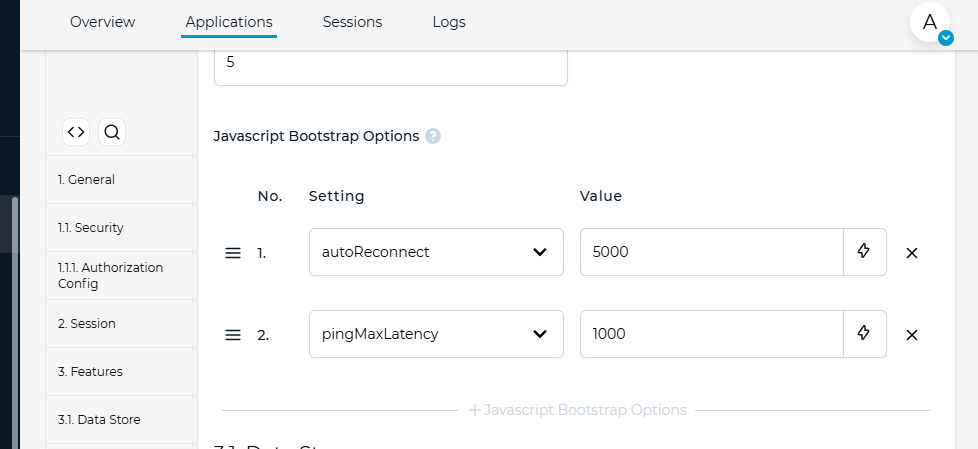
Other javascript bootstrap options can be configured in Admin Console -> application web configuration -> Javascript Bootstrap Options. Some of the bootstrap options can be still overridden in custom index.html in bootstrap options.
Webswing Instance API Reference
api.bootstrap will return an instance of webswing object with a set of functions. Check the reference below.
| Methods | Description |
|---|---|
| start | This initiates the connection to Webswing server and starts the Swing application. If autoStart is false, call this function manually. When autoStart is omitted, the API defaults it to true and starts automatically. |
| disconnect | Disconnects the current Webswing session, but leaving the swing application running. |
| configure | Configure instance options before start. |
| kill | Disconnects the current Webswing session with stopping the swing application. |
| destroy | Destroys the Webswing instance to the state before bootstrapping the HTML div. |
| setControl | Enables/disables the control of application. If set to false, no user events are sent to the Swing application. |
| repaint | Notify webswing server that the application needs repaint. |
| instanceId | Returns current instance id. |
| getWindows | Returns all instance windows (Swing windows, HtmlPanel windows and internal windows). |
| getRenderedWindows | Returns all instance windows (Swing windows, HtmlPanel windows and internal windows) that are rendered in current browser window. |
| getWindowById | Find a window by its id. |
| getWebComponentById | Find an internal web component by its id. |
| performAction | Perform an action that triggers server-side listener. |
| callAction | Call an action that triggers server-side listener. This call returns a Promise with call result. |
| logout | Disconnects the current Webswing session and logs user out. |
| getConnectionInfo | Get information about this instance's connection to server. |
| isUndocked | Returns true if this script is running in an undocked instance |
| getFilesManager | Get extended API for managing files. |
| getElement | Returns the host element currently associated with the instance. When detached, the host does not contain the Webswing content. |
| setElement | Attaches the instance content to an HTMLElement, or detaches it while preserving the connection when passed null. |