
Overview
Webswing brings existing desktop applications to a web browser. Webswing 26.2 supports Java desktop applications and adds Linux Web Launcher (LWL) for native Linux desktop applications. The application runs on infrastructure you control, while users interact with its interface through the browser.
Over the years, organisations have invested in business-critical desktop applications built with Java technologies such as Swing, JavaFX, SWT (Eclipse), NetBeans Platform and Oracle Forms, as well as in native Linux desktop applications. These systems continue to support important workflows, while desktop deployment can make application access, installation and updates harder to manage. Browser-based delivery provides another way to make this existing software available to users.
Webswing provides a browser delivery path for both application types. Configure Java applications with the launcher for their framework, or choose the Linux launcher for native Linux desktop applications. The Admin Console is used to configure the application; its runtime requirements and integration steps depend on the selected launcher.
Webswing supports the following application types:
- Swing Applications
- JavaFX Applications
- Eclipse SWT Applications
- Netbeans Platform Applications
- Java Applets
- Oracle Forms
- Native Linux desktop applications — Linux Web Launcher (LWL)
Java application delivery:
- No browser plugin is required.
- Existing application code can be retained for browser delivery; check application-specific dependencies and integrations.
- Supported Java frameworks are listed above.
Capabilities described for Java application sessions include:
- Session monitoring and control
- Live control of user sessions
- Session recording & playback
- Memory and CPU usage statistics
- Integrated log viewer
- Advanced access control and authentication options
- Testing possibilities
Who is it for?
Webswing is designed for teams that want browser access to existing desktop software while retaining its application logic and familiar interface. Java applications use their framework-specific configuration guides. Native Linux desktop applications use Linux Web Launcher and do not need to be written in Java. The Linux application runs on the session host; users do not need Linux installed on their own devices.
Also supports Java Applets running in modern browsers.
Java UI integration. If you are building a web frontend that needs to reuse existing Java UI components, Webswing can integrate those components with the browser through its Java integration APIs, including JsLink. This Java-specific integration path is separate from the native Linux application runtime.
Why run your Java desktop app in Webswing?
Benefits over traditional desktop deployment:
- 🔒 Protects your application’s codebase
- 🚀 Simple distribution of application updates
- 🎯 Control over Java runtime version
- 🔐 No client-side Java required = reduced security risks
- 🌐 Faster backend connections (no VPNs or local installs)
- 🎫 Centralised user access and session management
- ☁️ Infrastructure agnostic – run it on your own hardware, cloud, containers, or VMs
- 🌍 Browser agnostic – runs in all modern browsers
- 🧱 Framework agnostic – integrate with any frontend web framework when needed
- ☕ JVM agnostic – supports Java 8, 11, 17, 21 and 25, and works with OpenJDK
Limitations of the Java application runtime:
- ⚠️ It does not work well with multimedia-heavy applications – video is not supported, and sound has limited support
- ❌ 3D hardware-accelerated content is not supported
- 🎮 Not suitable for real-time action games due to rendering latency
- 💡 Requires more server-side resources (CPU/memory) per session compared to native web apps
What features are supported?
Native Linux applications. LWL delivers application windows and supports clipboard exchange, file transfers and browser-based printing. File chooser and print-dialog integration depend on the application toolkit; see the Linux launcher guides.
Java applications. The Java APIs and rendering details in the list below describe the Java runtime. JsLink, PDF font embedding and multi-screen settings do not apply to the Linux launcher.
- 🖨️ Printing integration with preview
- 📁 Filesystem access - upload / download / delete in isolated folder
- 📋 Advanced clipboard integration
- 🔁 Session recording and playback capability built-in
- 🌐 JsLink - call Java methods from JavaScript and vice versa
- 🧩 Embeddable JavaScript - embed Webswing in your web page
- 🎨 Custom window themes
- ☕ Java 8, 11, 17, 21 and 25 support
- ✅ Works with OpenJDK
Server-side capabilities:
- Admin Console for app configuration and monitoring
- Multi-tenant deployment with isolated login contexts
- Built-in security providers (SAML2, OpenID Connect) or pluggable auth
- Mirror View - live user screen monitoring
- Custom branding
- Cluster deployment
- Docker and Kubernetes support
How does it work?
Native Linux applications
Linux Web Launcher provides a compositor and capture runtime beside the Linux application. Wayland applications connect directly; X11 applications use XWayland. Webswing delivers the application windows to the browser and returns keyboard and mouse input to the application.
Java applications
The implementation and diagrams below describe the Java application runtime.
Java UI frameworks like Swing, JavaFX, SWT, NetBeans or Oracle Forms are all built to be cross-platform. This means their interaction with platform-specific features happens through well-defined, minimal interfaces (such as java.awt.Toolkit in the case of Swing).
Java provides platform-specific implementations for Windows, X11, and macOS.
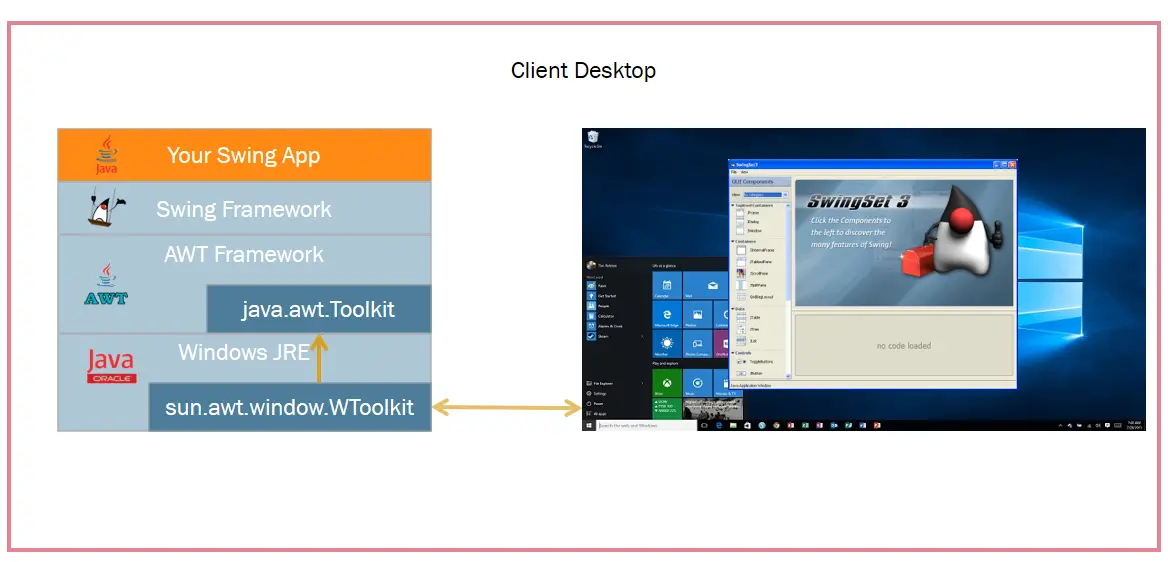
Webswing defines a new platform implementation called "Web", which effectively transforms the web browser into a virtual desktop environment. It maps all platform-specific rendering and input actions to equivalent browser operations in the most accurate way possible.
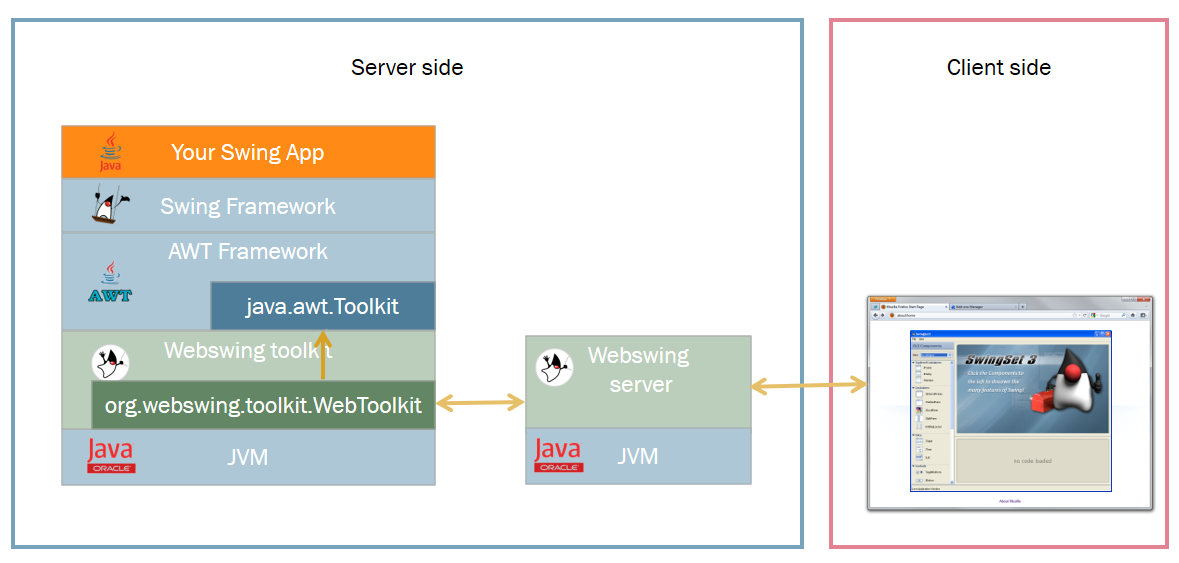
There are two essential functions every platform must support for Java desktop applications:
- Display content on screen
- Capture and process user input events
Webswing renders content inside the browser using HTML5 Canvas and captures user interaction (keyboard, mouse) using JavaScript. These input events are then translated into standard Java input events and sent back to the application.
Network Diagram
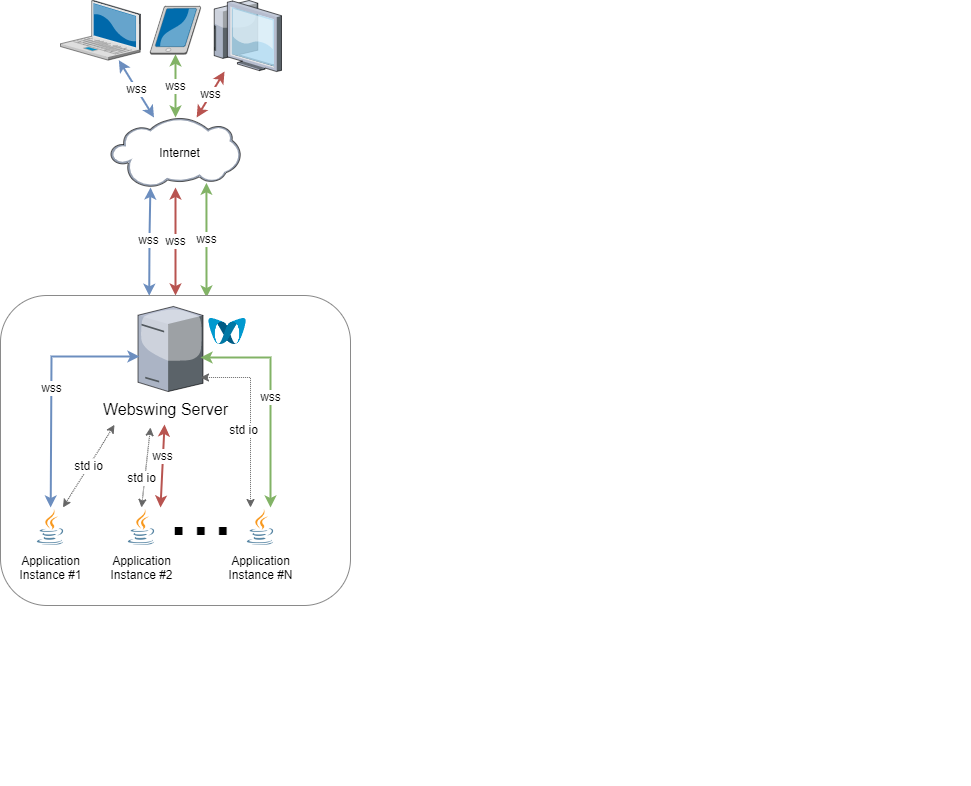
This section and its diagram describe browser delivery for a Java application in a standalone Webswing deployment. For native Linux application architecture, see Linux Web Launcher (LWL).
For cluster-based deployments, please refer to the Cluster Overview.
Application
This is typically a Java desktop application (Swing, JavaFX, SWT, NetBeans or Oracle Forms) running in its own JVM. It generates rendering events that are sent to the browser, and it receives user interaction events from the browser.
Webswing Server
Acts as an intermediary between the application and the browser. It is responsible for starting the application, establishing WebSocket connections, and managing the flow of data. It receives rendering events from the application and delivers them to the browser. It also captures user input events from the browser and forwards them to the application. The server can run on a local machine, on-premises, in the cloud, or containerised (e.g., Docker, Kubernetes).
Browser
Acts as the client interface. It receives rendering instructions from the server, displays the UI using HTML5 Canvas, and captures user input events which are then sent back to the server.
Communication
All communication happens over the network using the WebSocket protocol. The process works as follows:
- The application generates a rendering event and sends it to the Webswing server.
- The server receives the event and transmits it to the browser via WebSocket.
- The browser receives the event and updates the application's visual rendering.
- The user interacts with the interface displayed in the browser.
- The browser captures the interaction as a user input event and sends it to the server.
- The server forwards the event to the Java application.
- The application processes the input and updates its internal state accordingly.
Diagram
The diagram below illustrates the communication process described above: