

System Properties
Following system properties can be used to change the defaults of Webswing.
Webswing Server and Webswing Cluster Server
Set these in server startup script.
| Property | Description | Default Value |
|---|---|---|
webswing.warLocation |
Location of WAR file | |
webswing.rootDir |
Root directory | ${user.dir} |
webswing.propertiesFile |
Path to properties file (including file name) | |
webswing.configFile |
Path to config file (including file name) | |
webswing.configReloadIntervalMs |
Number of milliseconds for config reload interval | 1000 |
webswing.defaultWelcomePage |
Path to default welcome page resource to show when "/" is accessed | /selector/index.html |
webswing.fileServletWaitTimeout |
Number of milliseconds to wait for a file to be ready for download | 300000 |
webswing.proxyContextPath |
Explicit servlet context path | |
webswing.httpsOnly |
Force https only, sets cookies as Secure and SameSite to NONE by default |
true if config has https enabled and http disabled |
webswing.cookieSameSite |
Value for SameSite cookie attribute if server runs in HTTPS only mode |
NONE |
webswing.disableHttpSecurityHeaders |
Disable HTTP security headers - X-Frame-Options, X-Content-Type-Options, X-XSS-Protection, Referrer-Policy, Strict-Transport-Security |
false |
webswing.keep.instances |
How many closed instances should be kept in memory. The instances can be viewed in Admin Console (-1 for infinite) | -1 |
webswing.websocketMessageSizeLimit |
Maximum size of websocket message in bytes | 1048576 |
webswing.websocketMessageTimeout |
Timeout for the websocket message to be sent in milliseconds | 30000 |
jetty.request.header.size |
Number of bytes as maximum request/response header size when using embedded Jetty | 524288 |
Domain-based application mapping
Set these JVM properties in the Webswing Server or Cluster Server startup script and restart the server after changing them.
| Property | Description | Default Value |
|---|---|---|
webswing.subdomainConfigPaths |
Use public domain names as application configuration paths and select applications from the forwarded host. | false |
webswing.subdomainsPublicProtocol |
Protocol used in public application URLs when domain-based mapping is enabled. | http |
See One Webswing server for multiple domains for configuration and proxy requirements.
Built-in XHeadless
Configure this in webswing.properties for the standalone server or webswing-sessionpool.properties for each Session Pool. The supplied files contain the default as a commented setting. A JVM -D argument takes precedence over the file. Restart that server or Session Pool after changing the setting.
| Property | Description | Default Value |
|---|---|---|
webswing.xheadless.enabled |
Automatically provide a built-in display on headless Linux when no display is configured or the configured local display is missing. Set to false to require an external X server configured through DISPLAY. |
true |
See XHeadless for display selection and recovery behavior.
Drop-in applications
Configure these in webswing.properties for the standalone or Cluster Server and in webswing-sessionpool.properties for every Session Pool. Cluster roles must use the same logical drop-in location; relative directory values are resolved against that role's webswing.rootDir.
| Property | Description | Default Value |
|---|---|---|
webswing.dropin.autodeploy.enabled |
Automatically install and register flat application ZIPs found in the drop-in directory. Set to false to keep already registered drop-in applications available without scanning or installing ZIPs. |
true |
webswing.dropin.dir |
Drop-in archive and installation directory. May be absolute or relative to webswing.rootDir. |
apps |
Automatic registration is performed once for each root configuration. Removing a drop-in application from the Admin Console, or removing its reference directly from the root configuration file, unregisters it without deleting the ZIP or extracted application folder. Later scans and restarts do not restore the removed reference. To register the application again, restore its ${webswing.dropin.dir}/<application> reference in the root configuration.
Server Statistics
Set these in server startup script.
| Property | Description | Default Value |
|---|---|---|
webswing.stats.interval |
Granularity of the metrics, average of last N seconds | 10 |
webswing.stats.historySize |
Number of observations kept in memory | 60 |
webswing.stats.memUsageWarn |
Threshold to generate a memory usage warning | 0.8 (80%) |
webswing.stats.latencyWarn |
Threshold to generate a network latency warning (milliseconds) | 700 |
webswing.stats.pingWarn |
Threshold to generate a ping warning (milliseconds) | 500 |
Application
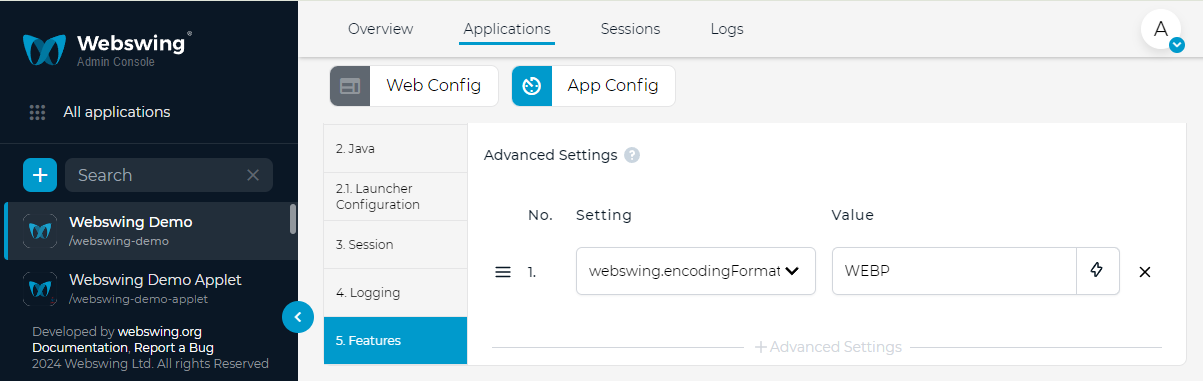
To configure advanced settings for application instance, see Advanced Settings field in Admin Console app config.
JWT
In order for the custom configuration to work, you must set the custom values on every module - Webswing Server (Cluster Server), Admin Console Server, Session Pool.
| Property | Description | Default Value |
|---|---|---|
webswing.jwt.serialization.gzip |
Use GZIP compression of JWT token | true |
webswing.jwt.serialization.binary |
Use binary serialization of JWT token | true |
webswing.jwt.serialization.encryption |
Use encryption of JWT token | true |
webswing.jwt.compression |
Enable JWT token compression | true |
webswing.jwt.audience |
Audience claim used for Webswing JWT tokens | webswing |
webswing.jwt.token.handshake.expiration |
Expiration of handshake token in milliseconds | 60000 |
webswing.jwt.token.access.expiration |
Expiration of access token in milliseconds | 300000 |
webswing.jwt.token.refresh.expiration |
Expiration of refresh token in milliseconds | 1800000 |
webswing.jwt.token.loginSession.expiration |
Expiration of login session token in milliseconds | 300000 |
webswing.jwt.token.unlockSession.expiration |
Expiration of unlock-session token in milliseconds | 300000 |
webswing.jwt.token.adminConsoleAccess.expiration |
Expiration of admin console access token in milliseconds | 300000 |
webswing.jwt.token.adminConsoleRefresh.expiration |
Expiration of admin console refresh token in milliseconds | 1800000 |
webswing.jwt.token.threadDump.expiration |
Expiration of admin console thread dump token in milliseconds | 1800000 |
webswing.jwt.token.recording.expiration |
Expiration of admin console recording-file token in milliseconds | 1800000 |
webswing.jwt.token.logs.expiration |
Expiration of admin console logs-file token in milliseconds | 1800000 |
webswing.jwt.clockskew.seconds |
Set maximum clock skew interval between servers in seconds | 180 |
webswing.jwt.adminConsole.accessId.expiration |
Expiration of admin console access id used in login process in milliseconds | 300000 |