

Session Pool
Session Pool is a simple JAR application. The main purpose of this module is to start, manage and communicate with an application instance. It connects to a Cluster Server via a WebSocket and it is always connected to all Cluster Servers in the Cluster. It is not desired that there is a connection problem between a Session Pool and a Cluster Server and this kind of problem should be resolved ASAP.
Unlike Cluster Server, Session Pool is stateful. When a Session Pool encounters a fatal error which leads to termination, all of the application instance processes that this Session Pool has created will be terminated as well.
Session Pool can be configured using the webswing-sessionpool.properties file. The table below describes the standard and supported properties used by Session Pool.
| Property | Description | Default value |
|---|---|---|
webswing.connection.secret |
Secret for securing sessions and websocket connections. It should be at least 128 characters and must be the same in every cluster module. | |
webswing.connection.secret.file |
Load the connection secret from a file. | |
webswing.connection.secret.random |
Generate a random secret when no direct, file, or script source is configured. This is unsuitable for separately running cluster modules, which must share one secret. | false |
webswing.connection.secret.script |
Command whose standard output supplies the connection secret; arguments may follow the script path. | |
webswing.connection.secret.script.timeout.ms |
Maximum time in milliseconds to wait for the connection-secret script. | 30000 |
sessionpool.id |
Session Pool ID. A random UUID is generated when it is omitted. A resilient pool must reuse its previous ID. | generated UUID |
sessionpool.priority |
Optional priority available to the Cluster Server load-balancer algorithm; a higher number means a higher priority. | 1 |
sessionpool.instances.max |
Maximum number of application instances in this pool; use -1 for unlimited. |
-1 |
sessionpool.static |
Prevent the auto-scaling service from stopping this Session Pool. | true |
sessionpool.idleAllowed |
Allow this pool to create idle instances when the application configuration also permits them. | true |
sessionpool.instances.maxIdle |
Maximum number of idle instances in this pool, further limited by each application configuration; use -1 for unlimited. |
-1 |
sessionpool.websocketWatcher.interval |
Interval in seconds for checking whether active Cluster Server websocket connections remain. | 1 |
sessionpool.configurable |
Allow application configuration changes to be sent to this Session Pool. | true |
sessionpool.close.with.session |
Close this Session Pool after an application session closes. | false |
sessionpool.close.with.session.delay |
Delay in milliseconds before closing a pool after its session closes. | 3000 |
sessionpool.forcefulExit.delay |
Delay in milliseconds before forcefully exiting a closing pool. | 10000 |
sessionpool.reconnect.interval |
Time in seconds to keep reconnecting after a Cluster Server connection is lost; use -1 for unlimited and 0 to omit this limit. The pool exits when no active server connection remains and reconnecting is exhausted. |
60 |
sessionpool.reconnect.retries |
Maximum reconnect attempts after a Cluster Server connection is lost; use -1 for unlimited and 0 to omit this limit. |
5 |
sessionpool.reconnect.delay |
Delay in milliseconds between reconnect attempts. | 3000 |
webswing.websocketUrlLoader.type |
Source of Cluster Server websocket URLs: propertyFile, propertyFile_noReload, or script. |
propertyFile |
webswing.websocketUrlLoader.interval |
URL reload interval in seconds while connected. | 5 |
webswing.websocketUrlLoader.interval.disconnected |
URL reload interval in seconds while disconnected. | value of webswing.websocketUrlLoader.interval |
webswing.server.websocketUrl |
Comma-separated Cluster Server websocket URLs for the property-file loader. | ws://localhost:8080 |
webswing.websocketUrlLoader.script |
Script that prints a comma-separated URL list for the script loader. | |
webswing.websocketUrlLoader.script.timeout |
Maximum time in seconds to wait for the URL-loader script. | 5 |
webswing.websocketUrlLoader.script.emptyOnError |
Replace the current URL list with an empty list when the URL-loader script fails. | false |
webswing.server.websocket.truststore.type |
Truststore type for secure websocket connections. | |
webswing.server.websocket.truststore |
Truststore path for secure websocket connections. | |
webswing.server.websocket.truststore.password |
Truststore password for secure websocket connections. | |
webswing.server.websocket.hostnameVerifier.disabled |
Disable websocket TLS hostname verification. | false |
webswing.server.websocket.proxyUri |
HTTP proxy URI used for websocket connections. | |
webswing.sessionPoolDumpDir |
Directory for Session Pool thread dumps. | datastore/dumps in the shipped properties |
sessionpool.threaddumps.cleanup.interval.minutes |
Interval in minutes for cleaning up old thread dumps and recordings. | 1440 |
sessionpool.threaddumps.retention.days |
Number of days to retain thread dumps and recordings; use a non-positive value to disable cleanup by age. | 30 |
sessionpool.destroyForcibly |
Forcefully destroy an application process when normal termination does not complete. | true |
sessionpool.createThreadDumpBeforeKill |
Create a thread dump before forcefully killing an application process. | true |
sessionpool.createThreadDumpWhenNotResponding |
Create a thread dump when an application process does not respond. | true |
sessionPool.waitForThreadDumpBeforeKill |
Maximum time in seconds to wait for a thread dump before killing a process. | 10 |
sessionPool.waitForHeapDump |
Maximum time in seconds to wait for heap-dump creation. | 1800 |
sessionPool.websocketHandlerTimeout |
Maximum time in milliseconds to wait for Session Pool websocket message handling. | 5000 |
webswing.logsDir |
Directory where Session Pool logs are stored. See Logging Configuration for the Session Pool's separate log4j2.xml. |
logs/ |
Cluster Session Pool handles everything related to the application instance, therefore it needs access too application binaries, libraries, fonts and application configuration (webswing-app.config).
Cluster Session Pool installation includes:
- webswing.war
- webswing-app.config
- webswing-sessionpool.properties
- sessionpool.bat / sessionpool.sh
- application jar binaries and libraries
- fonts
Here is an example of a webswing-app.config file:
{
    "/webswing-demo" : {
        "allowUpload" : true,
        "allowDownload" : true,
        "isolatedFs" : true,
        "sessionLogging" : false,
        "allowJsLink" : true,
        "javaFx" : true,
        "javaFxClassPathEntries" : [ "${webswing.rootDir}/apps/javafx/*.jar" ],
        "homeDir" : "${webswing.rootDir}/apps/WebswingDemo",
        "theme" : "Murrine",
        "directdraw" : true,
        "debug" : true,
        "jreExecutable" : "${java.home}/bin/java",
        "javaVersion" : "${java.version}",
        "launcherType" : "Desktop",
        "launcherConfig" : {
        "mainClass" : "org.webswing.demo.WebswingDemoApp"
        },
        "swingSessionTimeout" : 300,
        "timeoutIfInactive" : false,
        "allowDelete" : true,
        "allowAutoDownload" : true,
        "allowLocalClipboard" : true,
        "allowServerPrinting" : false,
        "dockMode" : "ALL",
        "allowStatisticsLogging" : true,
        "testMode" : false,
        "jsLinkWhitelist" : [ "*" ],
        "transferDir" : "${user}/upload",
        "clearTransferDir" : true,
        "sessionLogFileSize" : "${webswing.sessionLog.size:-10MB}",
        "transparentFileSave" : true,
        "sessionLogMaxFileSize" : "${webswing.sessionLog.maxSize:-1000MB}",
        "transparentFileOpen" : true,
        "fontConfig" : { },
        "classPathEntries" : [ "*.jar" ]
    }
}
Drain mode
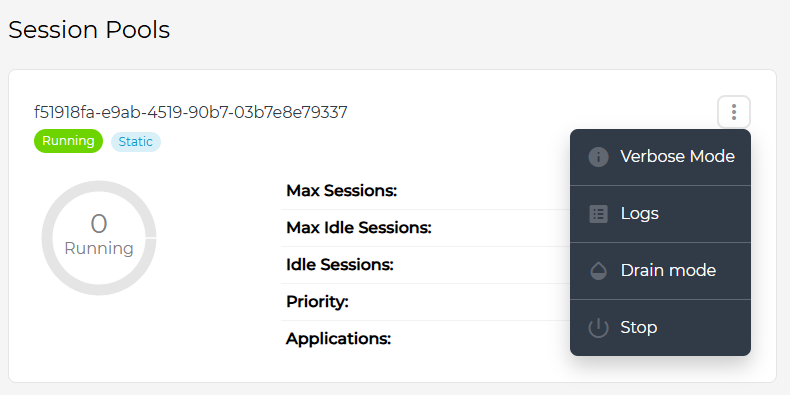
Drain mode is useful when you want to shutdown a Session Pool or do some maintenance and you don't want to interfere with running sessions on that Session Pool. Drain mode will simply not allow to connect any more sessions. Note that drain mode does not automatically shutdown the Session Pool after all sessions finish. You can put Session Pool into drain mode in Admin Console.
Session Pool resilience
When session pool crashes, all sessions running on this session pool are lost and cannot be recovered. To be able to recover running sessions you can use the following configuration in webswing-sessionpool.properties.
# enables instance resilience - session pool can recover connection to app instance processes after restart
# NOTE: recovered session pool MUST have the same sessionpool.id
sessionpool.instanceResilience.enabled = true
# path where instance descriptors and process streams are stored
sessionpool.instanceResilience.descriptors.dir = descriptors
# how long should instance wait for session pool to become available again after session pool goes down (in seconds)
sessionpool.instanceResilience.heartbeatTimeout.instance = 60
To be able to recover the sessions Webswing redirects the process I/O streams to files. Stream files with process/session descriptors are stored in descriptors directory. You can also setup the timeout how long will the session wait to be recovered after session pool crashes. Note that the restarted session pool must have the same id as the previous session pool that crashed, otherwise sessions cannot be recovered.